.png?width=235&height=55&name=LV%20Logo-02%20(1).png)








.png?width=300&name=About%20(1).png)
.png?width=300&height=70&name=LV%20Logo-02%20(1).png)
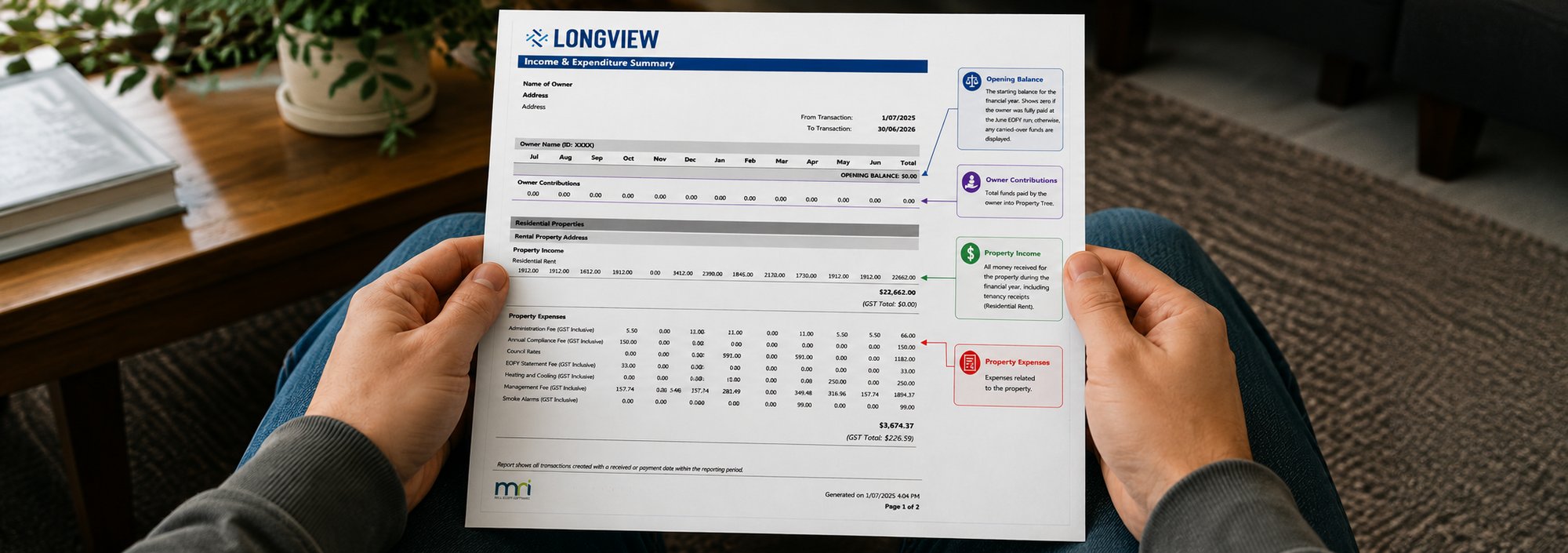

Your LongView Income & Expenditure Statement for the 2026 financial year will be issued on the afternoon of 1 July 2026. This guide walks you through how you will receive it, how to read it, how to use it in your tax return, and answers to the questions we hear most.
How you will receive your statement
If you receive communications by email
Your statement will be emailed to you, and a copy will also be available in the Owner Communications tab within Property Tree.
If you receive communications by post
Your statement will be mailed to you. A copy will appear in the Owner Documents tab in Property Tree once our accounts team has uploaded it manually, so allow a little extra time.
How to read your statement
Your statement summarises everything that flowed through your account for the year. The example below explains the key sections owners ask about most: your opening balance, owner contributions, property income, property expenses, owner payments and the closing balance.
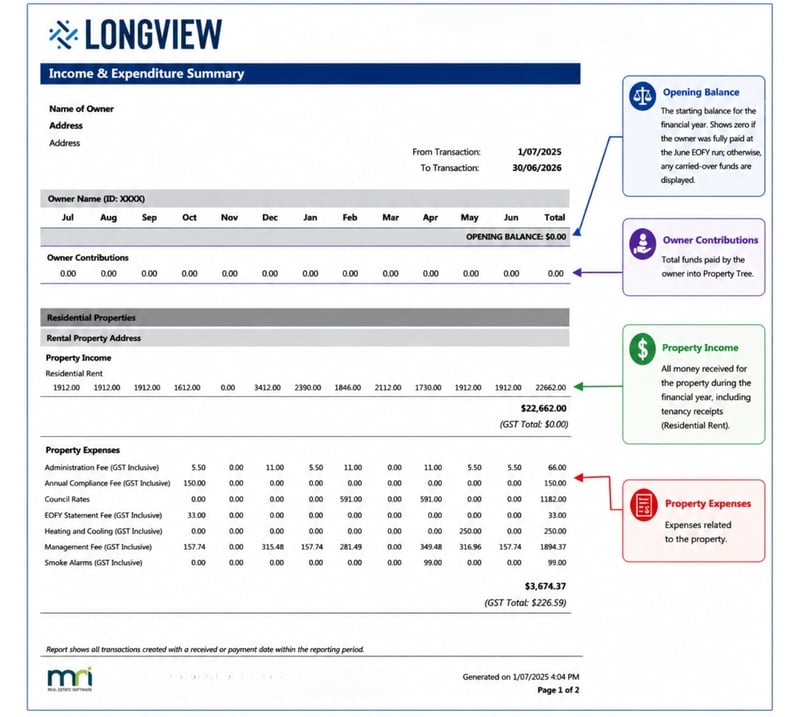
Annotated example statement (page 1): opening balance, owner contributions, property income and expenses.
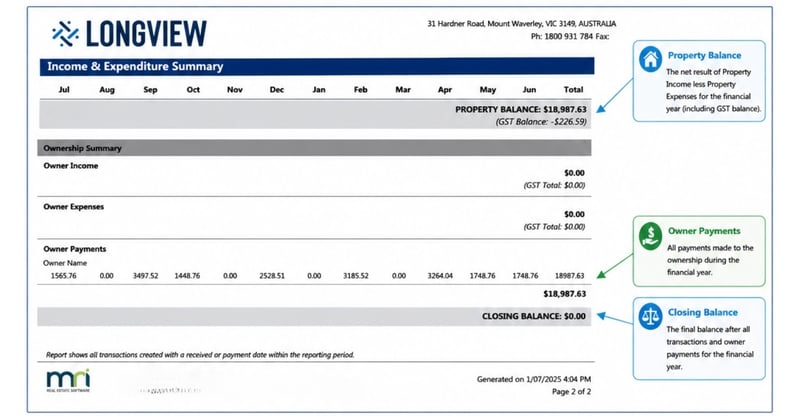
Annotated example statement (page 2): property income detail, owner payments and closing balance.
How to use your statement at tax time
For most Australian-resident individuals who held an investment property managed by LongView through the year, your statement maps to the rental section of your tax return (item 21, Rent) as follows:
-
Rental income. The total rental income for the year is reported at item 21, label P (Gross rent).
-
Expenses we paid on your behalf. The total expenses LongView paid for you are reported at item 21, label U (Other rental deductions).
-
Anything you paid directly. Property expenses you paid yourself, rather than through LongView, also go at item 21, label U.
Interest on a loan for the property is claimed separately at label Q, and capital works deductions at label F. If you lodge online through myGov, you enter these amounts in the Rent section rather than by letter label.
Item 21 labels P and U apply to both the 2025 and 2026 individual returns, but always confirm against your current return or with your accountant
What your statement does and does not include
Your annual statement from LongView is unlikely to include everything you need to complete your return. Other sources you may need to gather include:
-
Expenses for the property you paid directly rather than via LongView
-
Interest on any loan relating to the investment
-
Depreciation on capital items, if applicable
-
Capital allowances, if applicable
-
If you sold the property during the year, details of the capital gains tax cost base
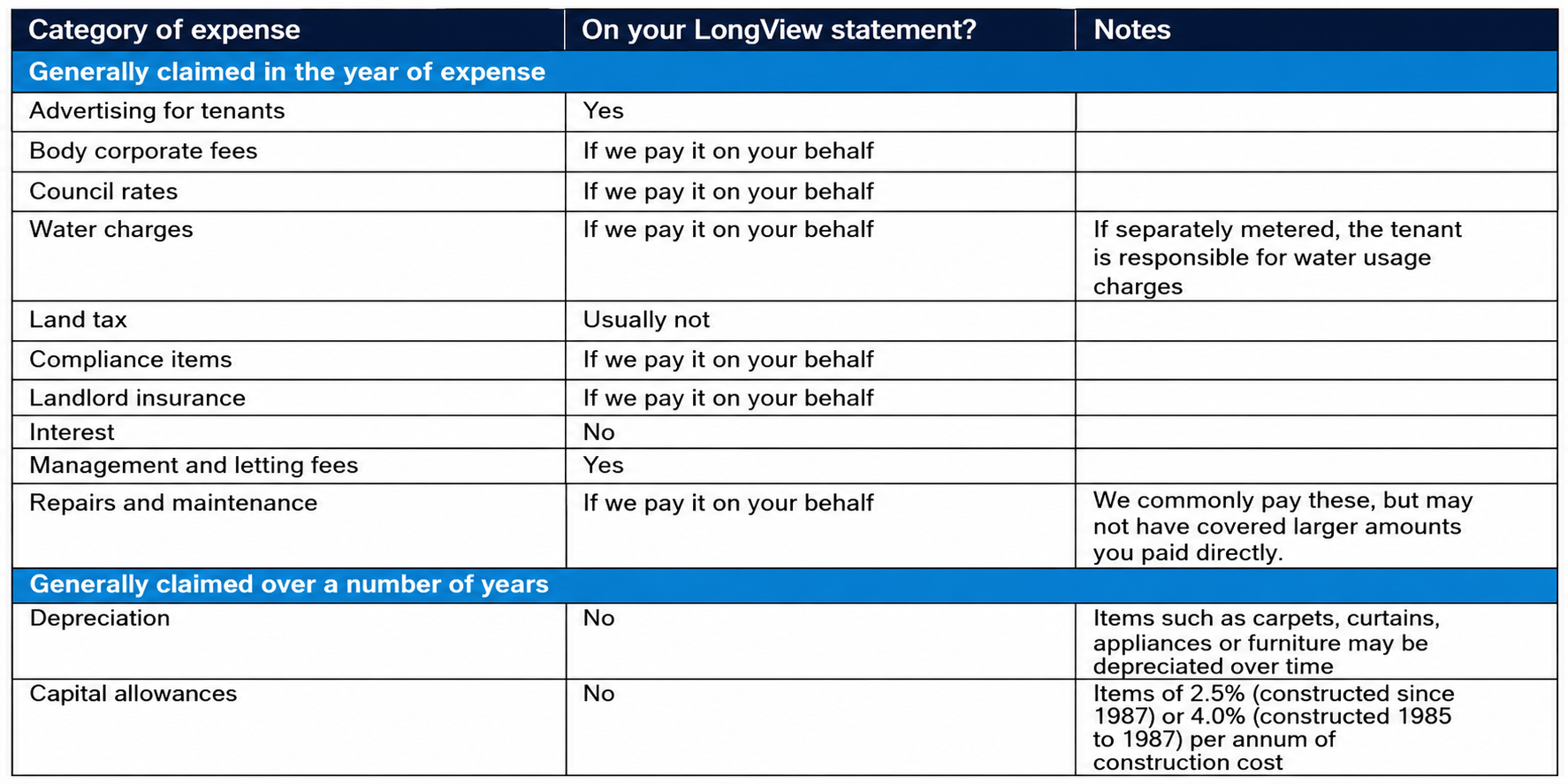
Deductible expenses: a quick reference
A general guide to common rental expenses and whether they typically appear on your LongView statement.
A note on accuracy. The ATO pays close attention to investment property claims and looks for deductions that appear excessive. It is worth making sure every figure you claim is accurate and supported by records.
Frequently asked questions
One month shows no rent, then the next shows two payments. Why?
Rent is reported by the date the tenant's payment reaches the trust account. If a tenant pays at the start of one month and the end of the next, a month can show no rent while the following month shows two payments. The Tenant Ledger lists exact payment dates and amounts.
Rent appears in one month, but my payment is in the next. Is that right?
Yes, this is normal. Transactions are shown by the actual date funds were received or paid, not the date they were processed. Rent banked on 30 April appears in April, but if it is accepted into Property Tree on 1 May, your matching owner payment appears in May.
Why are some transactions not on my statement?
Only transactions dated within the financial year, 1 July 2025 to 30 June 2026, appear. Anything outside that range is not included.
What is the Closing Balance at the bottom of my statement?
It is a balance carried forward, meaning funds still in your account. This can happen when funds are withheld on your ownership profile, when an invoice or fee remains unpaid due to insufficient funds, or when rent was received just before 30 June and not disbursed before year end.
Why is there an amount in the Debit column against Rent?
A debit against Rent is created when a rent receipt has been cancelled. Your ownership statements for the relevant dates will show when the cancellation occurred.
Need a hand with your statement?
If you cannot find your statement or would like a copy, we are happy to help. Reach out to your LongView team.
This guide has been prepared in good faith based on information believed to be accurate at the date of issue. It is general information only and is not financial product advice or tax advice. Property investors should obtain their own professional advice for their circumstances. To the maximum extent permitted by law, no warranty of accuracy or reliability is given and no responsibility (including for negligence) for errors or omissions is accepted by LongView Real Estate Pty Ltd and LongView Queensland Pty Ltd or any other member of the LongView group. This guide should be read together with your LongView annual statement.